Content Studio

AI content that
checks its own work

Most AI writers guess. Content Studio researches your topic on the live web, writes the article, links only to sources it actually read, adds a shareable fact card and a video matched to your exact subject — then publishes straight to WordPress.

Start Writing Smarter → See how it works
🖼️
cs-editor.jpg
Screenshot: Content Studio editor with a finished article — sections, fact-card preview, video embed in frame.
The problem with AI content

Anyone can spin words.
Almost nobody verifies them.

Generic AI writers produce confident text with invented sources and mismatched media — and Google is getting very good at spotting it. Content Studio is built the opposite way: every claim, link, and embed has to earn its place.

✕  Commodity AI spinners
  • Write from stale training data — no idea what's true about your topic today
  • Invent citations and dead links that erode reader trust and E-E-A-T
  • Attach whatever media loosely matches — the wrong city, the wrong subject
  • Hand you a wall of text to copy, paste, format, and upload yourself
  • One-shot output — don't like a section? Regenerate the whole thing
✓  Content Studio
  • Researches the live web first — the article is grounded in real, current sources
  • Links only to pages the research actually read — a URL is never made up
  • Matches video to your exact subject — an article about Ruiru gets a Ruiru video, or none at all
  • Publishes straight to WordPress — formatted, scheduled or instant
  • Fix any single section — regenerate, expand, or shorten with one click
How it works

From idea to live post.
One pipeline, five stages.

Every article moves through the same disciplined pipeline — the order below is the order it actually runs.

01
Plan 🗂️
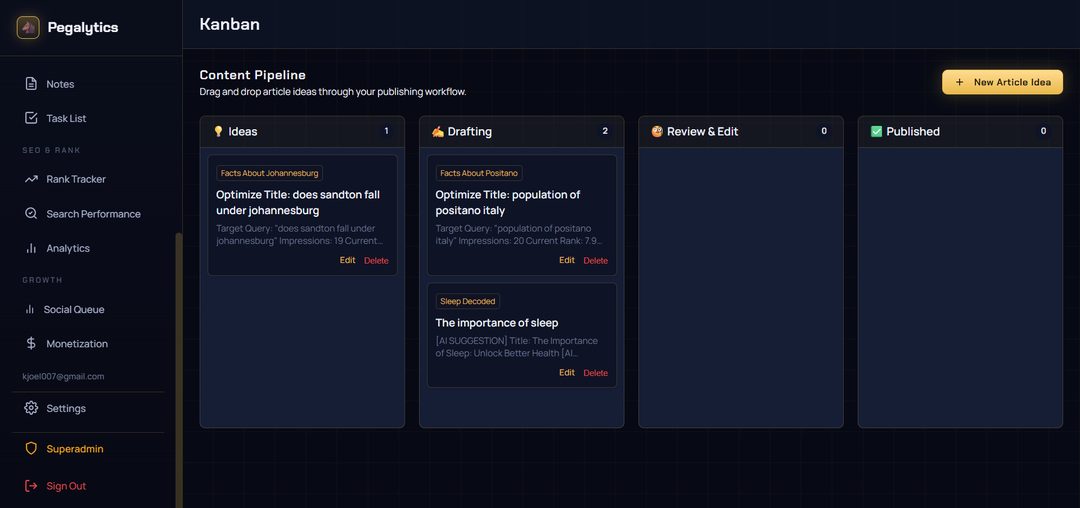
Organize ideas on a Kanban board that tracks every article from idea to live. Kanban AI helps you fill the backlog with topics tuned to each site, so no property in your fleet goes quiet.
02
Research 🔍
Before a word is written, Content Studio researches your topic across live web sources and collects what it finds. The article is built on current facts — not whatever the model half-remembers.
03
Write ✍️
A complete, SEO-structured article is assembled around your target keyword: headline, sectioned body, FAQ, and conclusion. Edit it in the built-in WYSIWYG editor, or fix one section at a time with Regenerate Expand Shorten.
04
Enrich 💎
Each article is packaged with an authoritative outbound link chosen from the research itself, a designed fact card (dark, light, or accent — regenerate until it's right), and a YouTube embed verified to match the article's exact subject.
05
Publish 🚀
Push to WordPress instantly or on a schedule — fully formatted, no copy-paste. Then hand it to the Social Queue so Bluesky and Mastodon announce the post the moment it goes live.
🖼️
cs-live-post.jpg
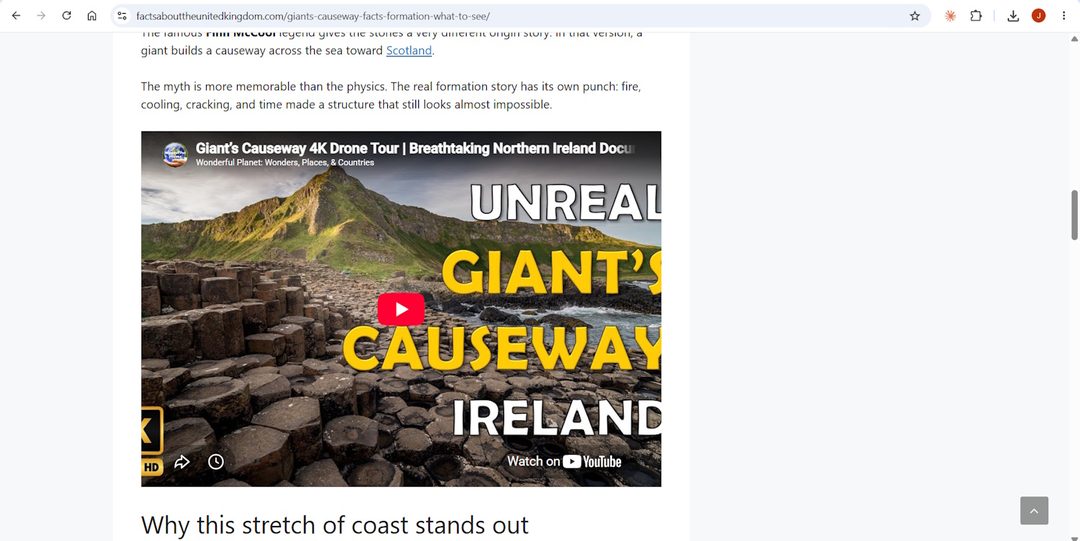
Screenshot: a live published post showing the fact card and the embedded subject-matched video — the finished product on a real site.
Accuracy is a feature

Every AI output is verified
before it ships.

AI is powerful and AI makes things up. Content Studio treats both as facts of life: everything the AI produces is checked by deterministic code before it reaches your article.

content-studio — article build
13:56:02📝 New article: "Things to Do in Ruiru, Kenya"
13:56:04🔍 Researching topic across live web sources…
13:56:11Article written — 9 sections, FAQ, conclusion
13:56:14Backlink verified against research sources
13:56:16Fact card rendered — ready to share
13:56:20Video matched: subject "Ruiru" confirmed in title
13:56:23Published to WordPress — live
🔗
Backlinks are real
The outbound link in your article is selected from the pool of sources the research actually visited — never generated from thin air. If no source measures up, the article ships without one.
🎬
Video matches the subject
An embedded video must carry your article's exact subject in its title — an article about Kikuyu gets a Kikuyu video, not a Nairobi one. No qualifying match means no video, on purpose.
🃏
Fact cards stay on-topic
Shareable fact cards are distilled from the article you just generated — the same researched content, condensed into a designed image your readers can share.
"Wrong data is worse than no data."
That's the operating rule behind Content Studio. When a link, video, or fact can't be verified, it's dropped — quietly and automatically. Your readers only ever see what passed the check.
Built for fleet operators

Publishing power tools,
not a text box.

Content Studio lives inside Pegalytics, so your content workflow sits next to your uptime, rankings, and revenue — for every site you run.

🖼️
cs-kanban.jpg
Screenshot: the content Kanban board with articles across columns — idea, drafting, scheduled, live — spanning multiple fleet sites.
🧩
Section-level control
Regenerate, expand, or shorten any individual section without touching the rest of the article. The full post is reassembled and kept in sync automatically.
🃏
Designed fact cards
Every article can carry a rendered fact card in dark, light, or accent style. Preview it in the editor and regenerate until the facts and look are right.
📅
Scheduled publishing
Queue articles to publish on your calendar. Content Studio handles the WordPress formatting and timing while you plan the next batch.
🗂️
Kanban pipeline
See every article across your whole fleet on one board — idea, drafting, review, scheduled, live. Nothing falls through the cracks.
📉
Content Decay Monitor
Published content ages. Decay scans flag the posts losing steam so Content Studio can be pointed exactly where a refresh earns the most traffic back.
📣
Social handoff
Fresh posts flow into the Social Queue for Bluesky and Mastodon, so distribution starts the moment publishing finishes.
Pricing

Included with every
paid plan.

Content Studio comes with Growth and Fleet Pro — alongside uptime monitoring, rank tracking, revenue analytics, and everything else in Pegalytics.

Fleet Pro
$49
per month
  • Content Studio — unlimited articles
  • Everything in Growth
  • Unlimited websites
  • Unlimited decay scans
  • Priority AI & support
Get Fleet Pro

Not ready to commit? The Free plan includes monitoring, analytics, and the content Kanban for up to 10 sites — upgrade to unlock Content Studio whenever you're ready. Full plan comparison on the pricing page.

Stop spinning.
Start publishing content that holds up.

Researched, verified, designed, and published — for every site in your fleet.

Get Content Studio with Growth →